Sales & bidding
Absentee & phone bids
Record absentee, phone and OR bids in the book, check them against your bid increments, confirm them to clients by email and print the bid book for the room.
Learn moreSales & bidding
Register bidders before or during a sale, number them automatically, set purchase limits and request guarantees, with every bidder's activity on one page.
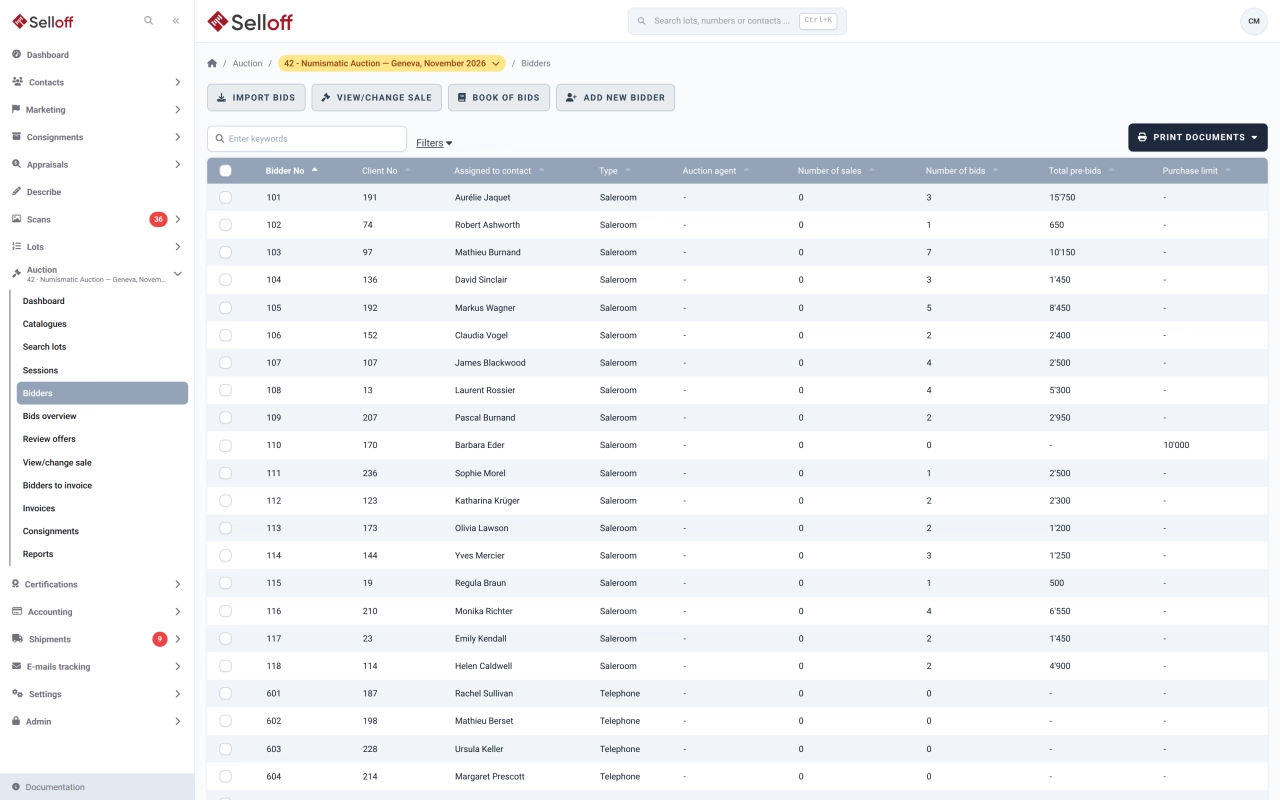
Each client who takes part in a sale receives a bidder number for that sale. Leave the number blank and Selloff assigns the next one from the range defined for the bidder type: room, telephone, internet or any other type you set up. Bidder types also feed the sale statistics.
A bidder can be registered weeks in advance or in a few seconds at the front desk, from an existing contact. Clients who bid on your website for the first time receive their bidder number automatically, and bidders registered on Drouot can be imported into the sale.
For each bidder you record a purchase limit, a sales agent and remarks. The limit defaults to the client's own limit, which you can update at the same time, and it is sent to the connected live bidding platform as the bidder's credit limit.
When you need security before accepting a participant, Selloff emails a guarantee request with the amount and a link to your online payment page. Once paid, the guarantee is marked as paid on the bidder.
The bidder page shows the client's tags, activities, bid statistics, purchase limit and buyer's premium, and all their bids: absentee, phone, OR bids, offers, sales and live bids. From there you add bids, record a hammer price or print the bidder's bid sheet.
The sale dashboard lists bidders with important tags, such as a payment warning, bidders with unpaid balances and bidders close to their purchase limit. The front desk and the auctioneer know who to check before the first lot is called.
Frequently asked questions
Yes. Enter the contact by name or client number, choose the bidder type and save. If you leave the bidder number empty, Selloff assigns the next free number in that type's range, and the bidder can bid straight away.
Each bidder can have a purchase limit for the sale; if none is entered, the client's default limit applies. The sale dashboard flags bidders whose winning bids are close to their limit, and the limit is passed to the connected live bidding platform.
Yes. Selloff emails the bidder a guarantee request with the amount and, when an online payment gateway is set up, a link to pay online. The guarantee is then tracked with the bidder until it is paid.
Related features
Record absentee, phone and OR bids in the book, check them against your bid increments, confirm them to clients by email and print the bid book for the room.
Learn moreOne record per contact with addresses, ID and bank details, tags, consignments, bids, invoices and a complete activity history shared by the whole team.
Learn moreBring bids, results and registrations from Drouot, Sixbid, Numisbids, Philasearch, Biddr and Excel files into your sale, with contact matching and a review step.
Learn moreRequest a demo
See Selloff running on a sale like yours.
We measure visits with Matomo, an analytics tool we host ourselves. Accept cookies so it can recognise returning visitors. If you refuse them, visits are still measured, without cookies. Privacy policy