Sales & bidding
Bidder registration & tracking
Register bidders before or during a sale, number them automatically, set purchase limits and request guarantees, with every bidder's activity on one page.
Learn moreSales & bidding
Record absentee, phone and OR bids in the book, check them against your bid increments, confirm them to clients by email and print the bid book for the room.
Absentee bids are entered on the bidder's page, lot by lot. Selloff refuses amounts that are not on the sale's bid increments and proposes the closest valid amount, rejects bids below the starting price, and stops a bidder from entering a second bid that is lower than or equal to one they already placed. OR bids let a client bid on one lot or another.
Bids placed on your own website through the Selloff API, for example with the WordPress plugin, arrive in the same book with no re-keying. Bids from other platforms are brought in with bid import.
Phone bids are entered by lot number, one per bidder and lot. Before the sale, Selloff groups them by bidder or by lot and distributes them among the staff members who will make the calls, warning about overlapping lot ranges. Each caller can be notified of their list, and the phone bid summary per session and the bidder sheets give them what they need in the room.
Clients receive a confirmation email for their absentee, phone and OR bids automatically. For extra control, a sale can require every bid entered manually, or imported, to be confirmed by another user; the dashboard lists the bidders whose bids are waiting for confirmation.
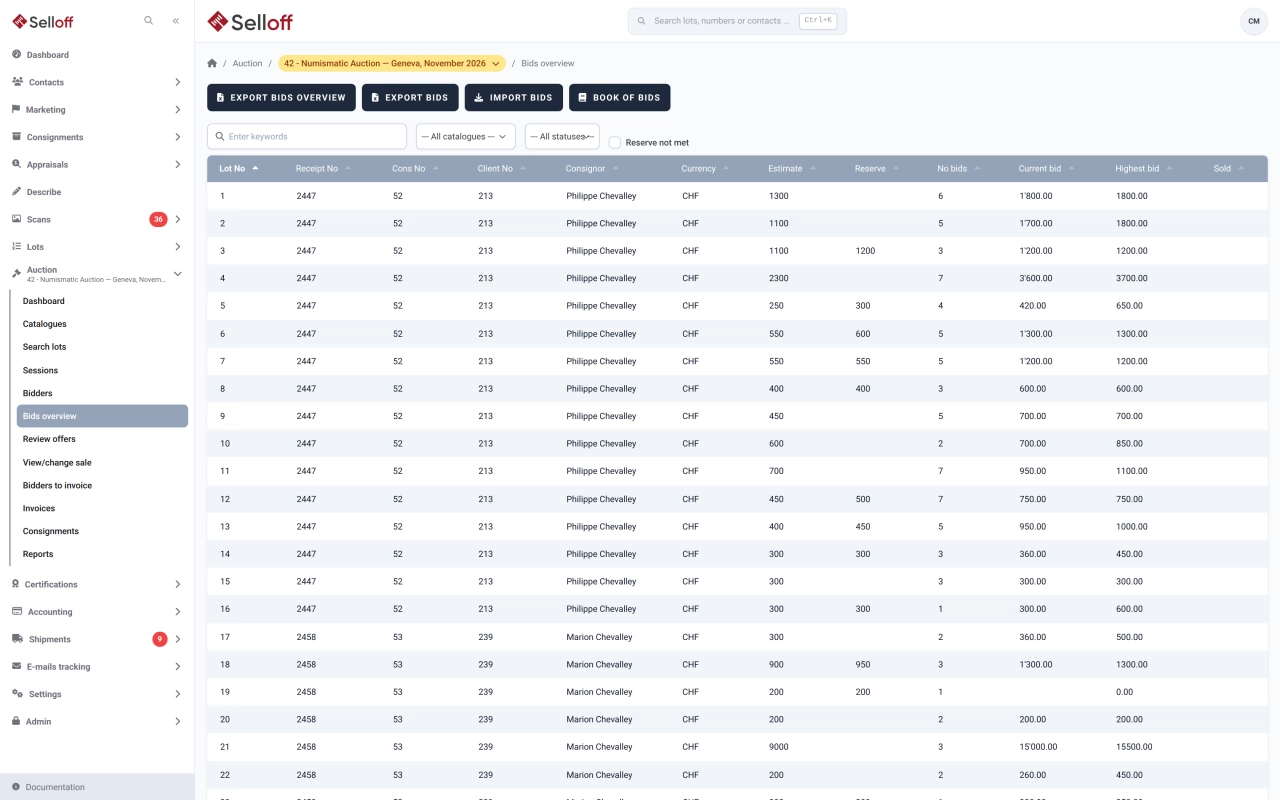
The bid book lists all bids by lot, for the whole sale, one session or a range of lots. The bids overview shows for each lot the estimate, reserve, number of bids, current bid and maximum bid, and exports to Excel. On the day, the same bids are available in the auctioneer's console.
Frequently asked questions
An OR bid lets a client bid on one lot or another, for example when they want only one of two similar items. Selloff records OR bids on the bidder's page and confirms them to the client with a dedicated email.
Yes. Select the staff members taking calls and Selloff distributes the phone bids between them by bidder and lot range. You can adjust the assignments, spot overlapping ranges and notify each caller of their list; the phone bid summary per session is ready to print.
Each bid is checked against the sale's bid increments and the lot's starting price as it is entered, and Selloff proposes the closest valid amount. A sale can also require a second user to confirm every bid entered manually or imported, and the dashboard lists bids still waiting for confirmation.
Related features
Register bidders before or during a sale, number them automatically, set purchase limits and request guarantees, with every bidder's activity on one page.
Learn moreBring bids, results and registrations from Drouot, Sixbid, Numisbids, Philasearch, Biddr and Excel files into your sale, with contact matching and a review step.
Learn moreRun the room from the auctioneer's console and take live online bids through Selloff Live Auction, with every hammer price recorded in Selloff.
Learn moreRequest a demo
See Selloff running on a sale like yours.
We measure visits with Matomo, an analytics tool we host ourselves. Accept cookies so it can recognise returning visitors. If you refuse them, visits are still measured, without cookies. Privacy policy