CRM
Opportunities pipeline
Track potential consignments from first contact to signed deposit, with owners, estimated values, next-step tasks and the reasons deals were lost.
Learn moreCRM
A home dashboard with your tasks, offers to review and sales to invoice, a dashboard for each sale, and a daily email listing the tasks due.
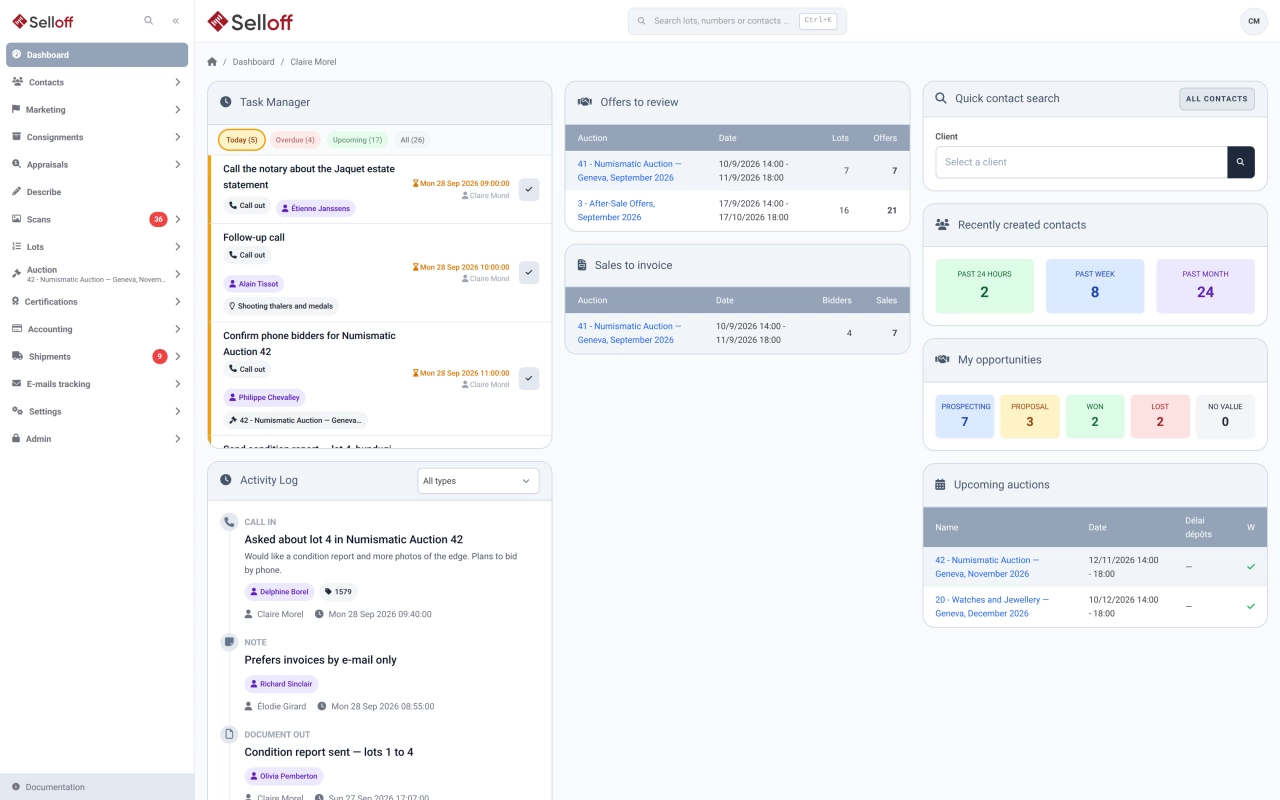
The home dashboard gathers what each user needs to act on:
Which layout a user sees depends on their role.
A task has a short description, a type (call, meeting, note, incoming or outgoing document), an assignee and a deadline. It is created from a contact or an opportunity and can be linked to the opportunity, campaign, consignment, receipt, invoice, appraisal, shipment, lot or sale it concerns, so the link in the task opens the right record.
Tasks are colour-coded: green when upcoming, yellow when due today, red when overdue. When done, a click marks them complete, and the completion is kept in the contact's history. Administrators decide which activity types can be used as tasks.
Every morning, users with tasks due today or overdue receive one email that lists them with their time, type and contact, and links to the related record. Nobody receives an empty reminder.
Each sale has its own dashboard for the auction team: lot count, totals of starting prices and low and high estimates, exchange rates applied on the sale dates, latest bids, the ten most active lots and bids by origin. Control widgets flag bidders close to their purchase limit, bidders whose contact carries a warning tag, bids entered by a colleague that still need confirmation, pending offers, bidders to invoice and bidders with an open balance.
Frequently asked questions
Yes. A task is a call, meeting, note or document to handle by a deadline, assigned to a user and attached to a contact, optionally with a related opportunity, campaign, consignment, invoice, appraisal, shipment, lot or sale. Each user sees their open tasks on the dashboard and ticks them off when done.
Yes. Each morning, users who have tasks due that day or overdue receive a digest email listing them, with a link to the related record. The email is sent in the user's language (English, French or German) and only when there is something to do.
For the selected sale: number of lots and totals of starting prices and estimates, the exchange rates applied, latest bids, most active lots, bids by origin, bidders close to their purchase limit or carrying warning tags, bids waiting for confirmation, offers to review, bidders to invoice and bidders with open balances.
Related features
Track potential consignments from first contact to signed deposit, with owners, estimated values, next-step tasks and the reasons deals were lost.
Learn moreOne record per contact with addresses, ID and bank details, tags, consignments, bids, invoices and a complete activity history shared by the whole team.
Learn moreCollect offers on unsold lots or in offer sales, decide lot by lot with the consignor's figures at hand, and notify bidders by email.
Learn moreRequest a demo
See Selloff running on a sale like yours.
We measure visits with Matomo, an analytics tool we host ourselves. Accept cookies so it can recognise returning visitors. If you refuse them, visits are still measured, without cookies. Privacy policy