Sales & bidding
Sales & auction types
Run auctions, offer sales, eBay-style timed sales and fixed-price sales, each with its own sessions, catalogues, dates, fees and bid increments.
Learn moreSales & bidding
Collect offers on unsold lots or in offer sales, decide lot by lot with the consignor's figures at hand, and notify bidders by email.
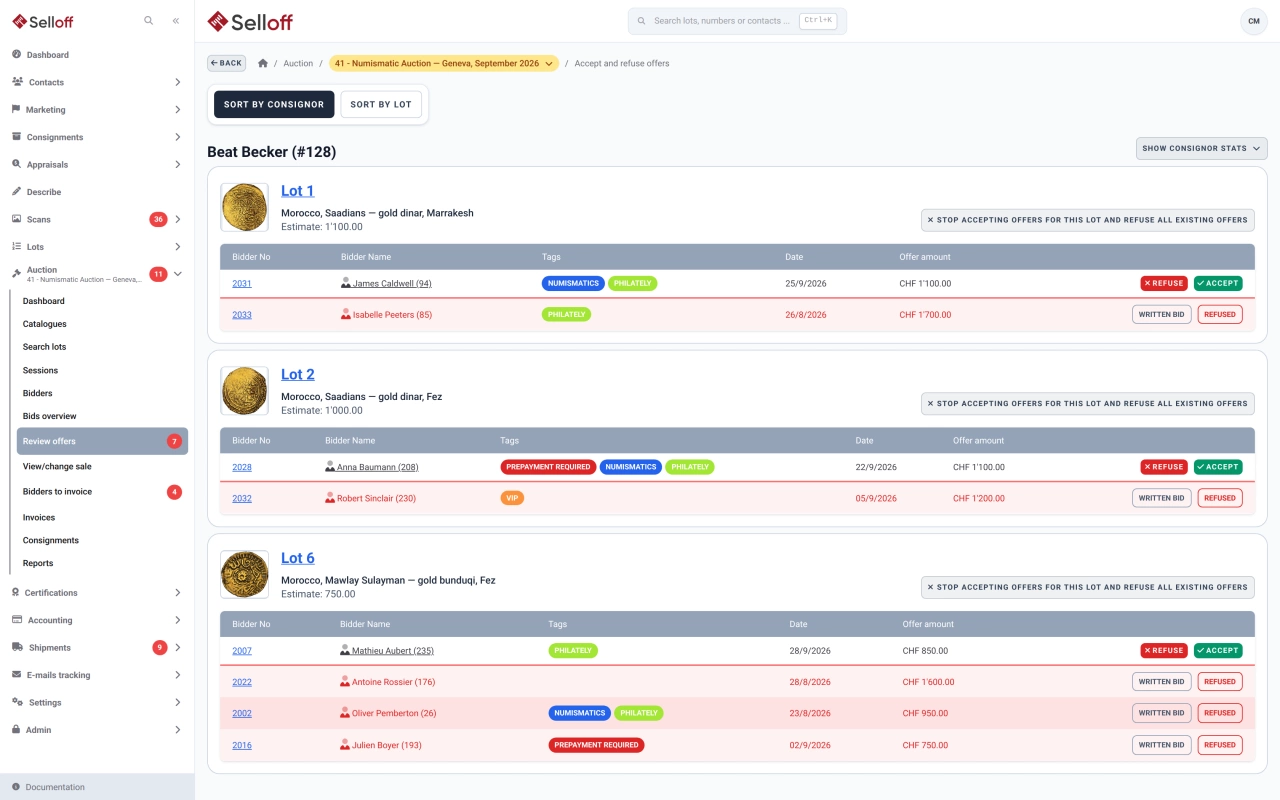
Not every lot finds a buyer in the room. When a sale allows it, unsold lots stay open to offers after a live auction, and in an eBay-style sale a bidder who arrives after a lot has closed is invited to make an offer. Offers come from your website through the Selloff API, or staff enter them on the bidder's page, for example after a phone call. Each bidder receives a confirmation email.
An offer sale collects offers until a closing date, with the estimate as the minimum offer. At the close, Selloff can assign the lots automatically: the highest offer at or above both estimate and reserve wins, at a set margin above the next-best offer (or above the estimate when there is a single offer), capped at the winning offer. A preview shows the proposed outcome for every lot before anything is saved.
The Review offers screen groups lots by consignor. For each lot it shows the estimate, the reserve, the pending offers with the bidders' tags, and the offers already refused. The consignor's figures for the sale (estimates, reserves, lots sold and unsold) help you decide or call the consignor. For each offer you can:
Bidders receive the decision by email, with any suggested amount. On the dashboard, one widget lists the sales with offers received and another shows the offers waiting for review in the current sale.
When a buyer asks for an authenticity check, the lot can be placed in extension: payment to the consignor stays blocked until the extension is validated. Certificate requests are followed from request to the expert's decision, and lots sent for certification are tracked in shipments.
Frequently asked questions
Yes, when the sale allows offers on unsold lots after a live auction, an option available for auctions and eBay-style sales. Offers arrive through your website or are entered by staff, and you accept or refuse them from the Review offers screen.
You can decide each lot yourself, or let Selloff assign lots at the close: the highest offer at or above both estimate and reserve wins, at a set margin above the next-best offer and never above the winning offer. A preview shows the result for every lot before it is applied.
Yes. Selloff emails bidders the decision on their offers. When you refuse an offer, you can suggest an amount you would accept, and it is included in the email.
Related features
Run auctions, offer sales, eBay-style timed sales and fixed-price sales, each with its own sessions, catalogues, dates, fees and bid increments.
Learn moreRegister bidders before or during a sale, number them automatically, set purchase limits and request guarantees, with every bidder's activity on one page.
Learn moreGenerate consignor statements for a whole sale, deduct commission, fees and VAT, pay consignors once buyers have paid and export transfers to your bank.
Learn moreRequest a demo
See Selloff running on a sale like yours.
We measure visits with Matomo, an analytics tool we host ourselves. Accept cookies so it can recognise returning visitors. If you refuse them, visits are still measured, without cookies. Privacy policy