Consignments
Consignor management
Set commission, lot fees, insurance, broker and representative per consignment, group lots under receipts, and keep each consignor informed from one page.
Learn moreConsignments
Record appraisals at the counter or on site, describe and photograph lots, bill a fixed or hourly fee and move accepted lots into inventory.
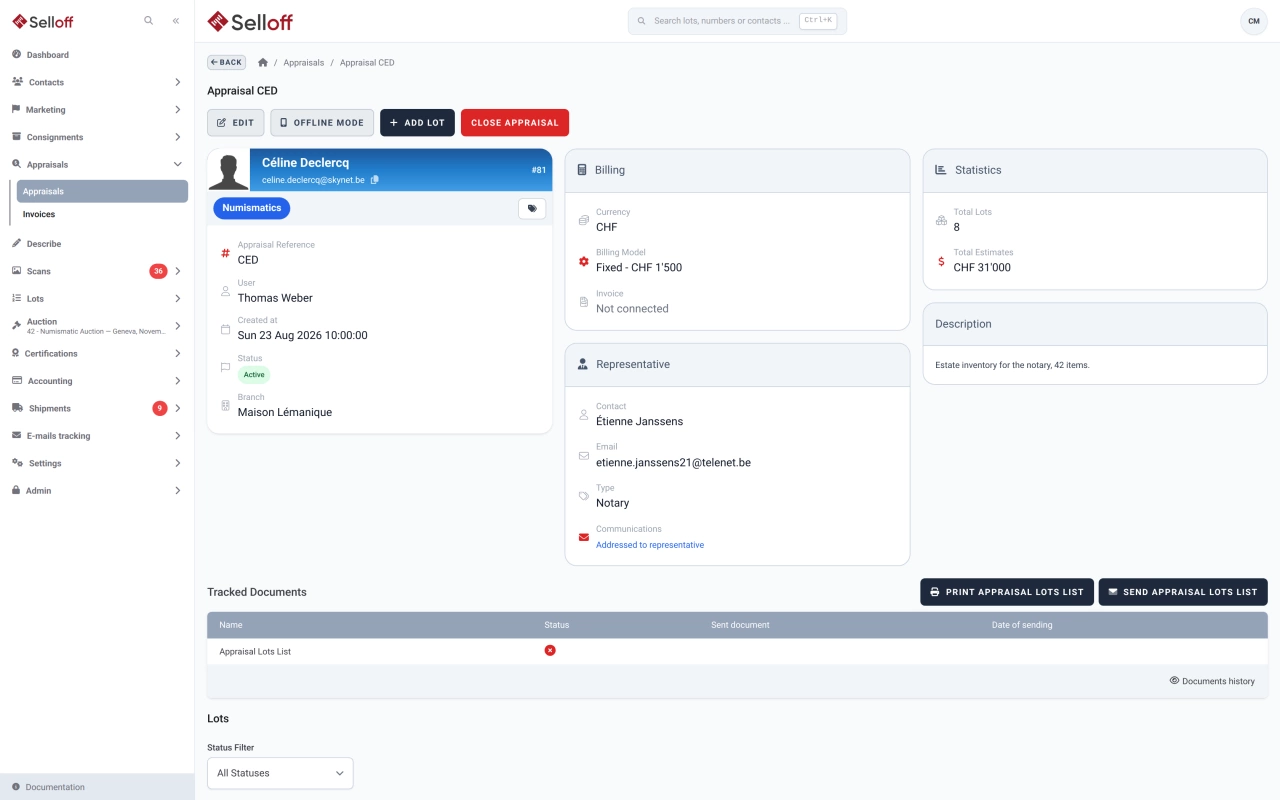
Appraisals are often where consignments begin: a valuation day, a visit to a family home, a collection brought to the counter. In Selloff, an appraisal is a file linked to a client, with an optional representative such as a lawyer or family member, a branch, a currency, a responsible user and a reference taken from a new or existing receipt. Appraisals are an optional module, enabled per installation.
Lots are recorded with the usual description screen: title and description, categories and tags, estimates, market value, location and images. Each lot shows when it was appraised and by whom, and the file shows the number of lots and total estimates. Lots can also be created in bulk from a spreadsheet.
Choose a fixed fee or an hourly rate per appraisal. Hourly work is measured with a built-in timer or manual time entries with notes. Closing the appraisal generates an appraisal invoice, with its own prefix and accounting category, sent to the client or the representative. An appraisal can be reopened until it has been invoiced.
The appraisal lot list, in English, French or German, shows each lot with its image, estimates and totals, and can include a signature block and your terms of sale. It can be printed or emailed, with the invoice attached, and every sending is logged on the appraisal. When the client decides to sell, accepted lots are promoted to inventory, ready for catalogue building.
Frequently asked questions
Each appraisal can be billed as a fixed fee or at an hourly rate. For hourly billing, staff start and stop a timer or enter time manually. When the appraisal is closed, Selloff previews and generates an appraisal invoice, addressed to the client or to their representative, with VAT applied according to your branch settings.
Select them and promote them to inventory. Their description, estimates and photos are kept, and once sales terms are attached they can be assigned to a catalogue like any other consigned lot. Lots can be returned to the appraisal as long as they have not been offered in a sale.
Related features
Set commission, lot fees, insurance, broker and representative per consignment, group lots under receipts, and keep each consignor informed from one page.
Learn moreHandle estate consignments with a representative such as an executor or notary, documents addressed to them, appraisals of the contents and single-owner sales.
Learn moreDescribe lots on a screen you configure, with texts, custom fields, categories and images, and generate repetitive headings and descriptions automatically.
Learn moreRequest a demo
See Selloff running on a sale like yours.
We measure visits with Matomo, an analytics tool we host ourselves. Accept cookies so it can recognise returning visitors. If you refuse them, visits are still measured, without cookies. Privacy policy