Inventory & catalogue
Lot references & barcode labels
Give every lot a unique reference in your chosen format, print barcode labels on Zebra printers from the browser and scan them at every step.
Learn moreInventory & catalogue
Assign lots to a sale, order them by category or any field, number them automatically or by scanning, and check the catalogue for errors before it goes live.
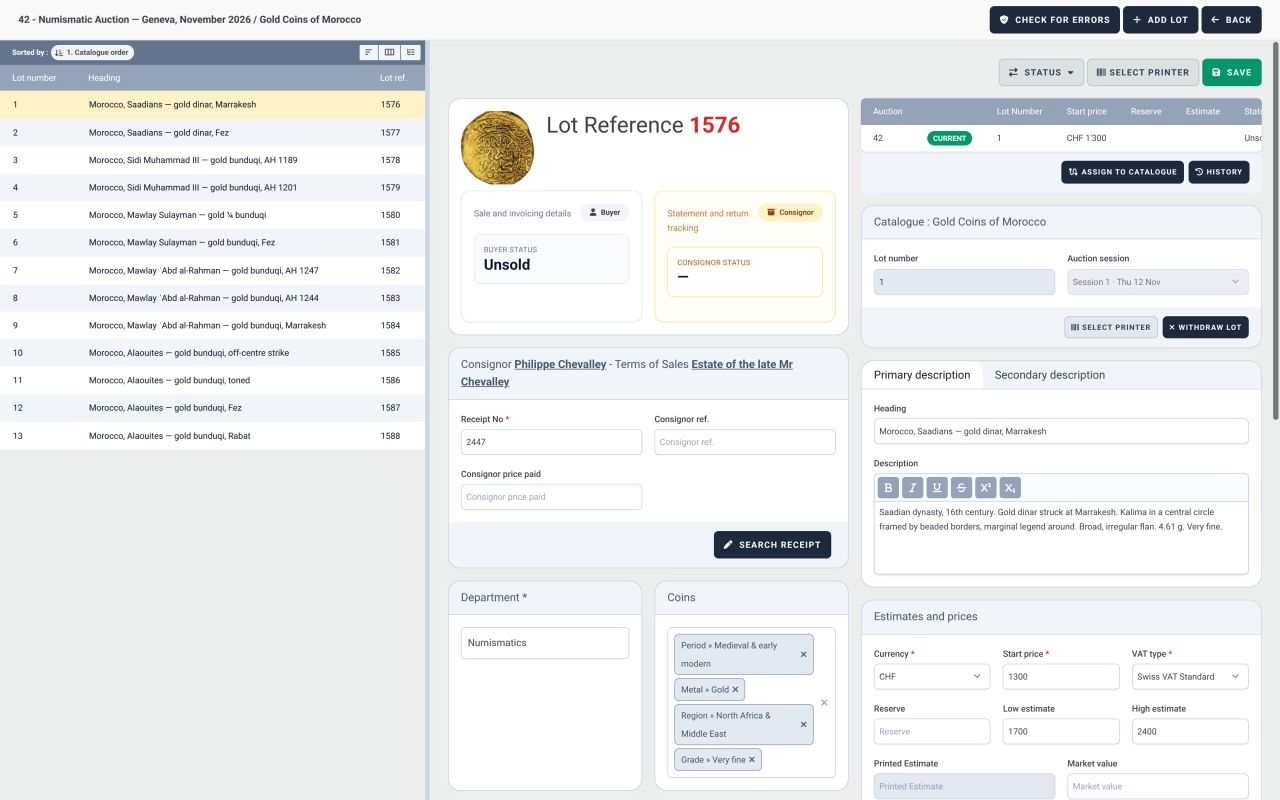
A sale in Selloff holds one or more catalogues, each with its own name, first lot number, URL slug, currency and catalogue manager. Lots come from the inventory: select them in a search, type or scan their references, or enter a range. When a catalogue is already numbered, a lot can be placed first or after a chosen lot, with its number and session. A lot can only be active in one catalogue at a time, and unsold lots move to the next sale without losing their history.
The ordering screen lists the catalogue's lots with the columns you choose. Sort them by main category, sort text, estimate, reference catalogue number or any other column, force the order of categories for this catalogue, then adjust by drag and drop or by moving a selection after a given lot. Apply order fixes the sequence. The same screen lets specialists open and edit each lot's description without leaving the catalogue.
Renumbering gives consecutive lot numbers from the first lot number, following the order you applied. Numbers can be cleared and reassigned until the catalogue is active. For lots laid out on tables or in trays, numbering by scan proposes the next free number and assigns it to each lot as its barcode is read. Catalogues can also work without lot numbers, using the lot reference instead.
The error check flags what would embarrass you in print: missing or inconsistent estimates, empty or duplicated texts, unnumbered or duplicated lot numbers, lots without a session, currency mismatches. A catalogue becomes active only when its lots are numbered, and assigned to sessions for live auctions. From then on, withdrawn lots stay visible as archived, and sold lots cannot be moved. Totals of starting prices and estimates per currency show the size of the sale at a glance, and highlights with an icon can mark featured lots for your exports.
Frequently asked questions
Once the lots are in the order you want, renumbering assigns consecutive numbers starting from the catalogue's first lot number. You can clear and renumber as often as needed before the catalogue goes live, number lots one by one by scanning their barcodes in the order they are laid out, or type a number yourself, including a suffix such as 12A.
Yes. The ordering screen sorts by lot number, title, catalogue order, lot reference, sort text, estimate, reference catalogue number or main category, and lets you force the order of categories for this catalogue. Individual lots can then be moved by drag and drop before you apply the order.
Among other things: lots with no estimate or a high estimate below the low one, empty descriptions, duplicate headings or descriptions, unnumbered lots, lot numbers used twice in the sale, lots without a session, currency mismatches and missing closing dates for timed sales.
Related features
Give every lot a unique reference in your chosen format, print barcode labels on Zebra printers from the browser and scan them at every step.
Learn moreProduce a PDF catalogue straight from your lots, or export texts and images for InDesign and other layouts, with image sizes and grouping by category.
Learn morePublish catalogues on your own website through the Selloff API and WordPress plugin, with instant updates, online bidding, client accounts and platform exports.
Learn moreRequest a demo
See Selloff running on a sale like yours.
We measure visits with Matomo, an analytics tool we host ourselves. Accept cookies so it can recognise returning visitors. If you refuse them, visits are still measured, without cookies. Privacy policy