Inventory & catalogue
Categories & taxonomies
Organise lots with your own hierarchical taxonomies, translated categories and description masks per type of object, shared with collecting areas.
Learn moreInventory & catalogue
Describe lots on a screen you configure, with texts, custom fields, categories and images, and generate repetitive headings and descriptions automatically.
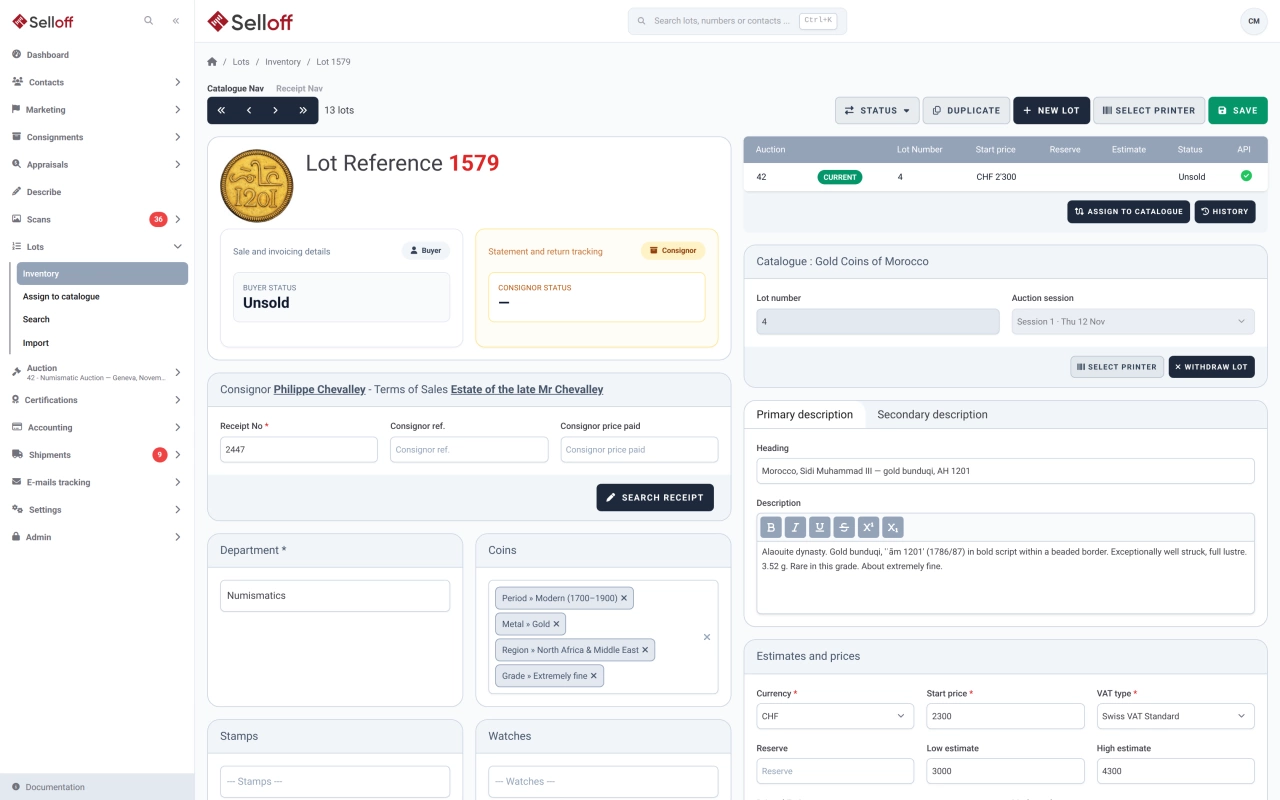
Describing is where most of a catalogue's time goes. Selloff's description screen shows, for each lot, the consignor data (receipt, consignor reference, price paid), the catalogue it is assigned to, the texts, the categories and tags, the packaging, the prices and the images. Administrators choose which fields appear in the main and secondary panels, set default currency, packaging, catalogue image size and VAT type, and decide which fields are left out when a lot is duplicated.
Every lot has a heading and a description, and an alternative heading and alternative description, for example for a second language. Eight single-line fields and two multi-line texts cover the details your speciality needs, such as dimensions, provenance, grade or literature, and their labels can be renamed for each interface language. If the heading is left empty, Selloff can build it from the start of the description. Notes for the auctioneer, a sort text and a reference catalogue with its number and value complete the record.
Many descriptions follow patterns. A field automation assembles a heading or a description from text blocks, each added when a condition is met, for instance when a custom field is filled in or a taxonomy contains a value, with tokens such as @lot.addtl_field_1 or a taxonomy slug replaced by the lot's data. The result stays consistent across thousands of lots, can be disabled on a lot that needs hand-written text, and is regenerated when you change the rule.
External experts can be given a describer role limited to describing lots and seeing their own work, with a count of lots they have described. Lots can be duplicated, labelled and traced through their sale history, and a spreadsheet import creates or updates up to 1,000 lots at a time. For the photos, see photo import; for categories, see taxonomies.
Frequently asked questions
Each lot has a heading and a description plus an alternative heading and description, which can hold a second language, and the labels of the description fields can be renamed for each interface language. The texts are written by your specialists; Selloff does not translate them automatically.
Yes. Field automations build a lot's heading, description or alternative texts from rules: text blocks added when a custom field or a category meets a condition, with tokens replaced by the lot's values. Automation can be switched off on an individual lot, and changing a rule regenerates the affected lots.
Yes. An Excel or CSV file can create lots on their receipts, with categories matched by ID or name and missing categories created if you wish, or update headings, descriptions, alternative texts, estimates, reserves and VAT of existing lots. Templates for both are downloadable, and each import handles up to 1,000 lots.
Related features
Organise lots with your own hierarchical taxonomies, translated categories and description masks per type of object, shared with collecting areas.
Learn moreRecord starting price, low and high estimates, reserve and printed estimate for every lot, adjust them in bulk, and keep the values used in each sale.
Learn moreUpload hundreds of photos at once, matched to lots by file name, with validation, required scan types and a coverage check before the catalogue goes to print.
Learn moreRequest a demo
See Selloff running on a sale like yours.
We measure visits with Matomo, an analytics tool we host ourselves. Accept cookies so it can recognise returning visitors. If you refuse them, visits are still measured, without cookies. Privacy policy