CRM
Email campaigns
Build targeted campaigns from contact lists, push them as segments to Mailchimp or Brevo, and follow costs, recipients and the business they bring in.
Learn moreCRM
Every email Selloff sends is logged on the contact with its content, attachments and delivery status, from queued to delivered, opened or bounced.
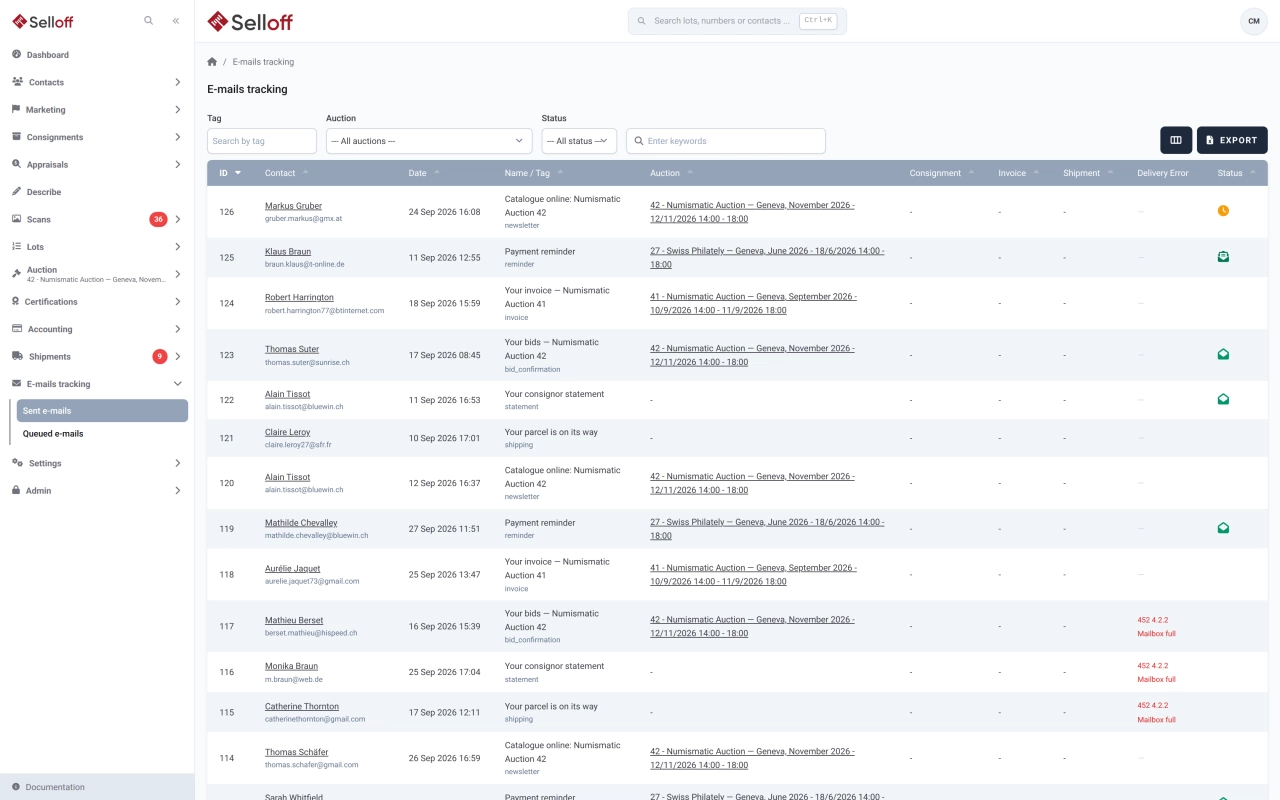
Auction houses send a lot of email: bid confirmations, invoices, payment reminders, description lists to consignors, shipping notices. When a client says "I never received it", you need an answer in seconds. Selloff records every email it sends as an activity on the contact, with the message content and attachments, and updates its delivery status as events come back from the mail server.
The sent emails list shows, for each message, the recipient, date, tag, and the sale, consignment, invoice or shipment it relates to, together with its status:
Filter by keyword, tag, sale or status, and export the results for analysis or archiving.
The queued emails list holds messages scheduled for later, with the time before which each one will not be sent. Until that moment, any of them can be cancelled.
Selloff also keeps your own correspondence. Each contact has an inbound address shown on the record: forward a message to it or add it in BCC, and the email is filed on the contact's activity feed with its text and first attachment. Clicking a contact's email address in Selloff opens your mail program with that address already in BCC, so filing becomes a habit rather than a chore.
Front-desk staff answer "did you get my email?" questions, accountants check that invoices and reminders were delivered, and specialists see the full exchange with a consignor before calling. See also client records and email campaigns.
Frequently asked questions
Yes. Each email sent by Selloff shows its status: queued, sent, delivered, opened, deferred, soft bounce, hard bounce or marked as spam, with the error message when delivery fails. Opens are detected when the recipient's mail program loads the message, so "not opened" does not prove the email was not read.
Yes. The queued emails list shows the date and time before which each message will not be sent. Until then, you can cancel it from that list.
Each contact record shows its own Selloff inbound address. Forward an email to it, or put it in BCC, and Selloff files the message as an activity on that contact, with its text and first attachment, assigned to the Selloff user who sent it. Clicking a contact's email address in Selloff opens your mail program with that address already in BCC.
Related features
Build targeted campaigns from contact lists, push them as segments to Mailchimp or Brevo, and follow costs, recipients and the business they bring in.
Learn moreOne record per contact with addresses, ID and bank details, tags, consignments, bids, invoices and a complete activity history shared by the whole team.
Learn moreCreate buyer invoices and consignor statements from recorded sales in a few clicks, with premium, insurance, fees, shipping and VAT calculated automatically.
Learn moreRequest a demo
See Selloff running on a sale like yours.
We measure visits with Matomo, an analytics tool we host ourselves. Accept cookies so it can recognise returning visitors. If you refuse them, visits are still measured, without cookies. Privacy policy