Accounting
Payment tracking & reminders
Record and apply payments, see what each client owes, send reminders at three levels with fees, and follow receivables in the aging report.
Learn moreAccounting
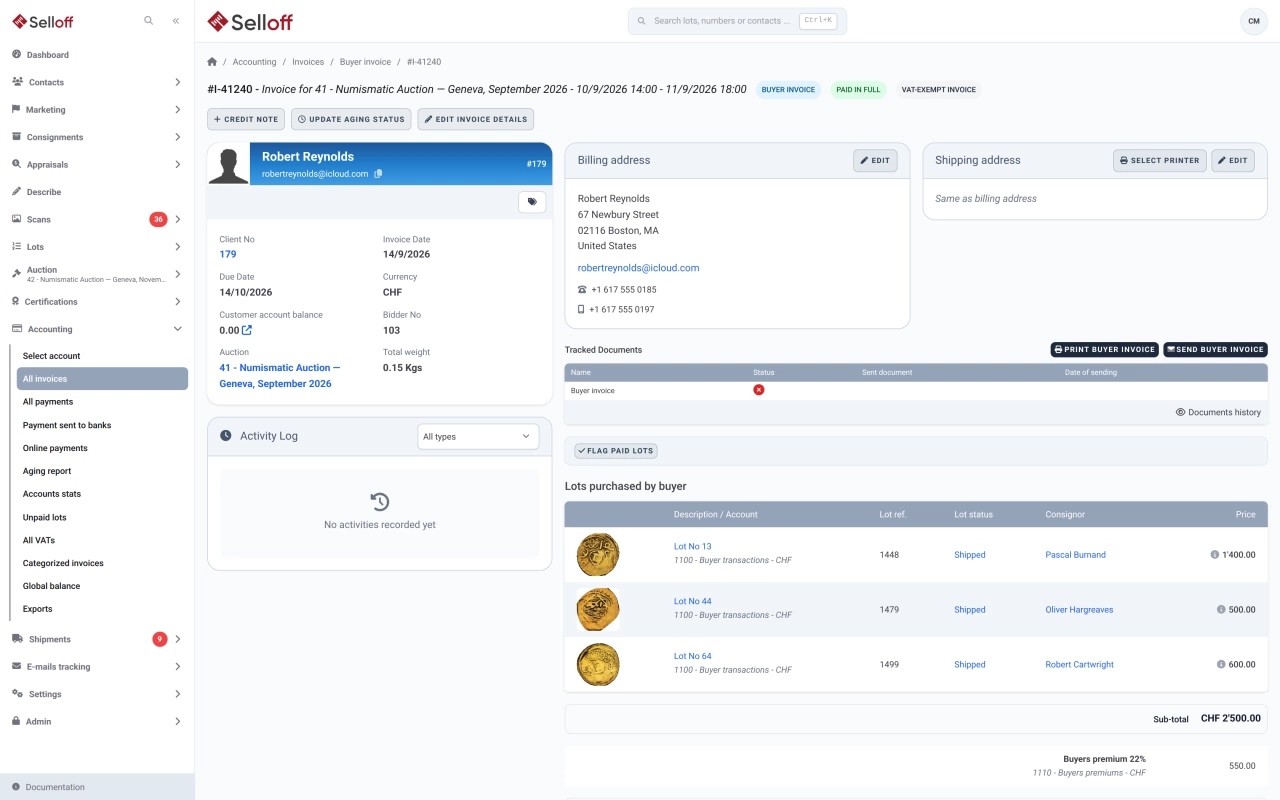
Create buyer invoices and consignor statements from recorded sales in a few clicks, with premium, insurance, fees, shipping and VAT calculated automatically.
After the sale, the Bidders to invoice list shows every bidder with lots not yet invoiced, with their currency, buyer's premium and any invoices already issued. Select bidders and create all their invoices at once, or create them one by one. A client who used several bidder numbers can receive a single invoice.
Each buyer invoice is composed from the sale and the client's settings:
If you enable it, lots sold in different currencies can be grouped on one invoice and converted into the invoice currency.
Consignor statements are built from the same results, with seller's commission, lot fees and insurance on sold and unsold lots, and lead into consignor settlements. Selloff also issues credit notes, debit notes, interest invoices, supplier invoices and supplier credit notes. Invoice references follow your own format: a prefix per invoice type, the sale number or dates, and zero-padded numbering.
Invoices print as PDFs in your house layout and are emailed one by one or in bulk; the list shows which ones have been sent. They can include a link to your online payment page and, for branches in Switzerland or Liechtenstein, a QR-bill in CHF or EUR. Once a payment is applied or the invoice is exported to accounting, it is locked against changes, and payment tracking takes over.
Frequently asked questions
Yes. In Bidders to invoice, select the bidders and create their invoices in one action. Selloff adds the buyer's premium, insurance, platform fees, shipping and VAT, and can merge a client's bidder numbers into a single invoice.
Yes, for branches in Switzerland or Liechtenstein, when the CHF or EUR bank account used for the invoice is set up for QR-bills, with a QR-IBAN and QR reference or with a classic IBAN. You can choose to print the QR-bill only when a balance is due.
You can adjust lines, shipping, premium or VAT as long as no payment has been applied and the invoice has not been exported to accounting. After that the invoice is locked, and corrections are made with a credit note or a debit note.
Related features
Record and apply payments, see what each client owes, send reminders at three levels with fees, and follow receivables in the aging report.
Learn moreGenerate consignor statements for a whole sale, deduct commission, fees and VAT, pay consignors once buyers have paid and export transfers to your bank.
Learn moreApply the right VAT to every invoice line by branch and client country, with dated rates, foreign VAT and a VAT report for your return.
Learn moreRequest a demo
See Selloff running on a sale like yours.
We measure visits with Matomo, an analytics tool we host ourselves. Accept cookies so it can recognise returning visitors. If you refuse them, visits are still measured, without cookies. Privacy policy