CRM
Segmentation & smart lists
Classify contacts with tags and collecting areas, then save dynamic lists that update themselves from bids, invoices, consignments and activities.
Learn moreCRM
Build targeted campaigns from contact lists, push them as segments to Mailchimp or Brevo, and follow costs, recipients and the business they bring in.
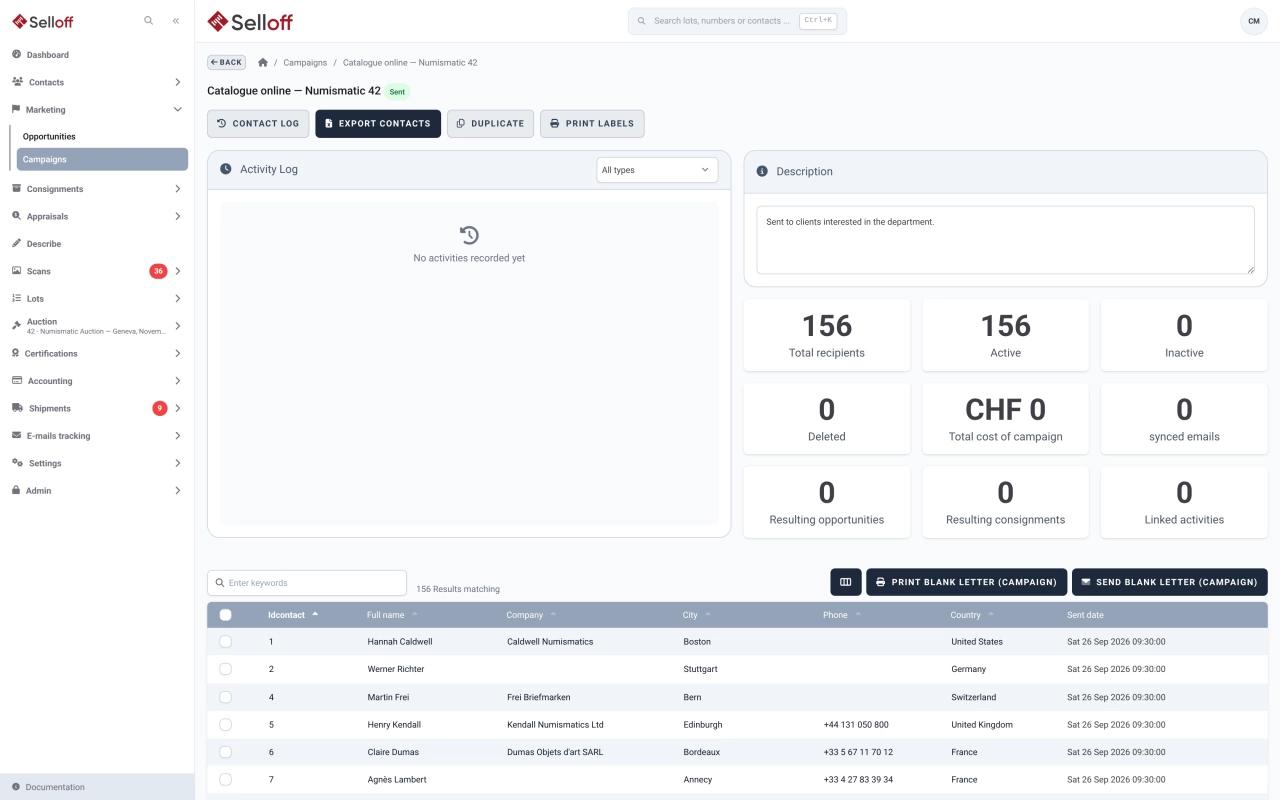
Auction houses still combine email, printed mailings and catalogue shipments. In Selloff, a campaign has a name, a description, a total cost and one of four types: segment in your email marketing service, email sent manually, print, or catalogue distribution. Campaigns move from draft to "segment created" to sent, and can be duplicated for the next sale. For postal mailings, a campaign letter can be printed or emailed to the selected recipients, and address labels printed for the envelopes.
Add contacts with the advanced multi-criteria search, selecting them one by one or taking all results, or start from a saved smart list. Every addition or removal is written to the campaign's activity log and on the contact's record, so you can always explain why someone did or did not receive a mailing. The statistics panel shows active, inactive and deleted recipients and the number of emails synced with the service.
When the recipient list is final, Create segment sends it to the active service: a static segment in Mailchimp, a dedicated list in Brevo. The campaign is then locked, so the audience you send to matches the one recorded in Selloff. Contact names, language, country and interests can be mapped to Brevo attributes.
Opportunities and consignments both have a "from campaign" field. Filter opportunities by campaign, compare them with the recorded cost, and export several campaigns at once to see who received what.
Alongside campaigns, Selloff sends its own transactional emails: bid confirmations, invoices and account notifications. Their texts can be edited in English, French and German, they can go out from your own sending domain, and each one is followed in email tracking.
Frequently asked questions
Yes. Print and catalogue distribution are campaign types of their own. You select recipients the same way, print their address labels or export them, record the campaign cost, and link resulting consignments and opportunities back to the campaign.
Every email address carries two subscriptions, transactional and marketing. When a contact unsubscribes in Mailchimp or Brevo, the change comes back into Selloff and is logged on the contact record. Double opt-in can be enabled for new marketing subscriptions.
Related features
Classify contacts with tags and collecting areas, then save dynamic lists that update themselves from bids, invoices, consignments and activities.
Learn moreEvery email Selloff sends is logged on the contact with its content, attachments and delivery status, from queued to delivered, opened or bounced.
Learn moreTrack potential consignments from first contact to signed deposit, with owners, estimated values, next-step tasks and the reasons deals were lost.
Learn moreRequest a demo
See Selloff running on a sale like yours.
We measure visits with Matomo, an analytics tool we host ourselves. Accept cookies so it can recognise returning visitors. If you refuse them, visits are still measured, without cookies. Privacy policy