Accounting
Integrated accounting
Keep client accounts, the chart of accounts, supplier invoices and balances inside Selloff, per branch and currency, without re-entering sales in another system.
Learn moreAccounting
Export buyer, consignor, payment and supplier entries by period, branch and currency to Sage Accpac, OM Finance, Quadra or CSV, without re-keying.
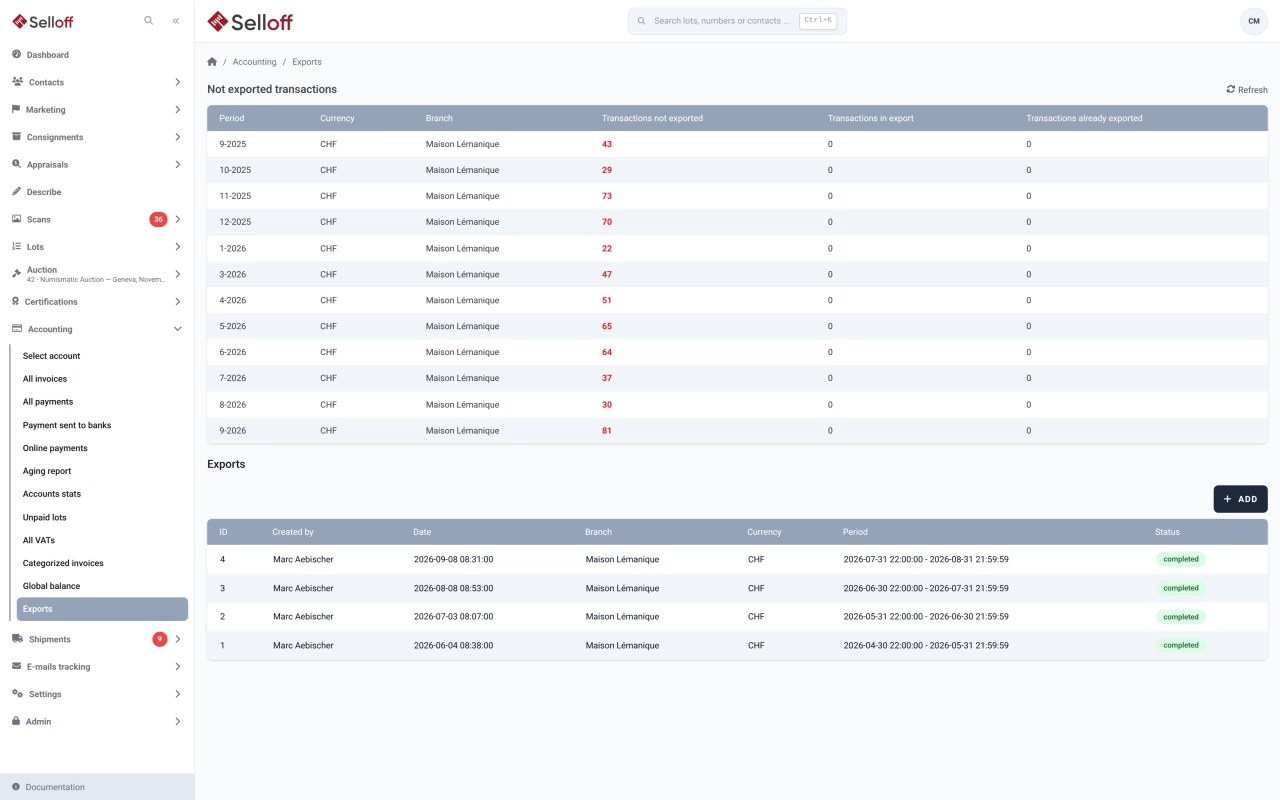
Every invoice and payment in Selloff creates accounting transactions. The Exports screen summarises them by period, currency and branch: transactions not yet exported, transactions in an export being processed, and transactions already exported. Create an export for a period, branch and currency, and Selloff prepares the entries in four files: buyers, consignors, payments and suppliers.
Each file can be downloaded in the format of your accounting software:
Each account can have an export number that differs from its number in Selloff, and counterpart values are set per branch, currency and transaction type for the accounting systems that need them.
Once transactions are exported, they can no longer be modified: an invoice included in an accounting export is locked, and corrections go through a credit or debit note. The list of exports shows who created each export, for which period, branch and currency, and its status (in progress, successful or failed), so your accountant always knows what has been transferred.
Accounting staff run the export for each period and import the files into the general ledger, with no manual entry of sales, commissions, payments or VAT. The fiduciary or external accountant receives files in the format their software expects.
Frequently asked questions
Selloff produces export files in the formats of Sage Accpac, OM Finance and Quadra, and a CSV format for other accounting software.
No. Transactions included in an accounting export are locked, so what your accountant has imported stays consistent with Selloff. Corrections are made with a credit note or a debit note, which go into the next export.
Buyer invoices, consignor statements, payments and supplier documents, each in its own file, with accounts, amounts, VAT and counterparts, for the period, branch and currency you select.
Related features
Keep client accounts, the chart of accounts, supplier invoices and balances inside Selloff, per branch and currency, without re-entering sales in another system.
Learn moreApply the right VAT to every invoice line by branch and client country, with dated rates, foreign VAT and a VAT report for your return.
Learn moreCreate buyer invoices and consignor statements from recorded sales in a few clicks, with premium, insurance, fees, shipping and VAT calculated automatically.
Learn moreRequest a demo
See Selloff running on a sale like yours.
We measure visits with Matomo, an analytics tool we host ourselves. Accept cookies so it can recognise returning visitors. If you refuse them, visits are still measured, without cookies. Privacy policy