Inventory & catalogue
Catalogue building & numbering
Assign lots to a sale, order them by category or any field, number them automatically or by scanning, and check the catalogue for errors before it goes live.
Learn moreInventory & catalogue
Produce a PDF catalogue straight from your lots, or export texts and images for InDesign and other layouts, with image sizes and grouping by category.
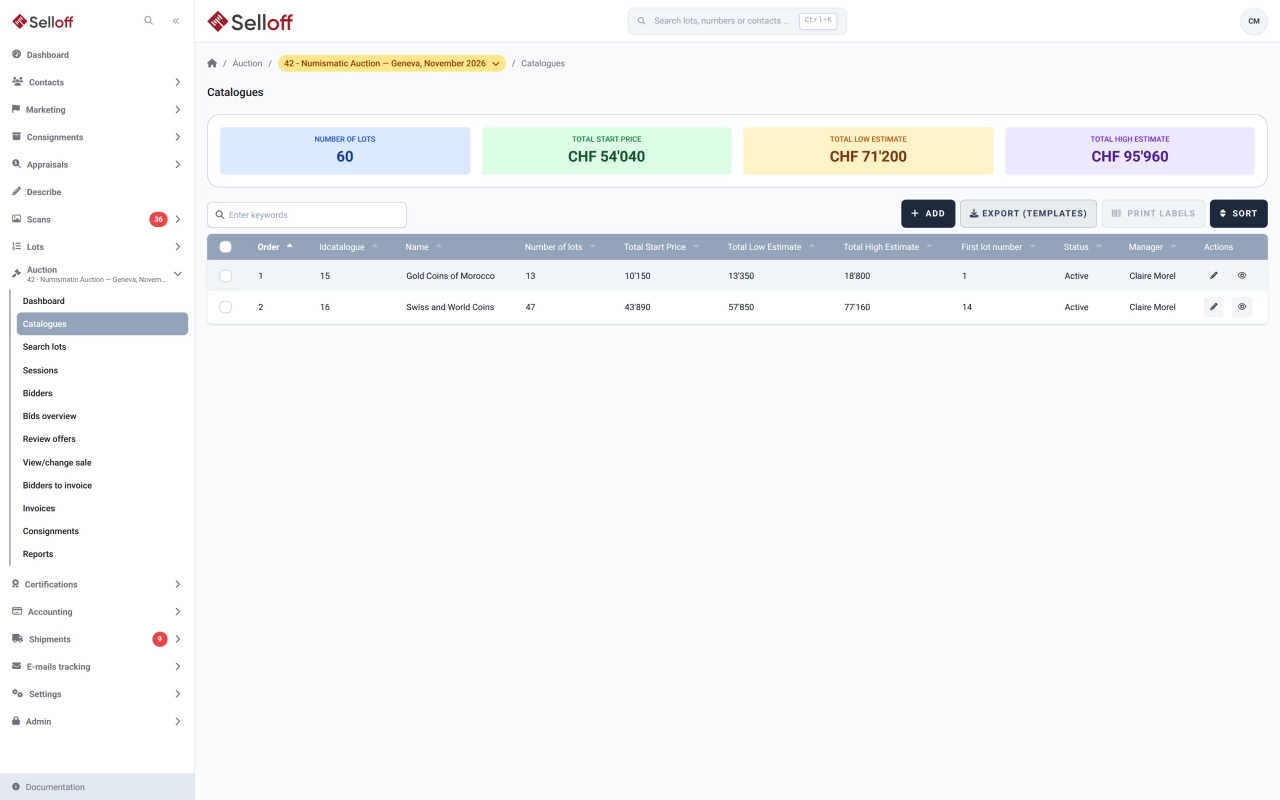
By the time a catalogue is numbered, everything it needs is in Selloff: descriptions, estimates, categories, lot numbers and photos. Producing the catalogue should not mean copying it all again.
From the catalogue page, the PDF catalogue is generated in the order you applied to the lots. Its layout comes from an editable template in the document engine: title and first page, the columns of the lots table (lot number, reference, heading, description, alternative texts, estimates, main image or all images, categories, tags, a custom field), which scan types to include, grouping by category over several levels, one to six images per row and a maximum image height. Large catalogues are generated in the background. A numbering list can also be printed for the saleroom and, after the sale, the prices realised list as a PDF, with or without unsold lots, or as an XLSX file.
For a designed print catalogue, the XML export delivers the lot texts, category levels and page-number markers, and the images are exported alongside. With EasyCatalog in Adobe InDesign, and the Adobe scripts available on request, the layout places in-text images, fills the photo pages and replaces the markers with page numbers. Catalogue image sizes, set per lot, define how each photo is resized, its maximum width and height in millimetres, and whether it goes in the text or on a photo page.
Export templates turn a catalogue, or a whole sale, into data files and image sets for printers, partners and platforms: CSV, XLSX, JSON or XML, images renamed with patterns such as the lot number, in original, medium or thumbnail size. Ready-made templates are provided, and fields can be mapped, cleaned or transformed in your own. Finished PDFs of the catalogue, terms of sale and prices realised can be attached to the catalogue for publishing online.
Frequently asked questions
There are two routes. Selloff generates a PDF catalogue itself from a template, which suits proofs, smaller sales and the PDF you publish online. For a designed print catalogue, it exports the texts and images as XML for Adobe InDesign with EasyCatalog; a set of Adobe scripts, available on request, places images in the text and inserts page numbers.
Images of the catalogue scan type. At upload, an image can be marked for the catalogue only if its resolution is at least 300 DPI. Each lot then has a catalogue image size that sets the resize percentage, maximum width and height in millimetres, and whether the image sits in the text or on the photo pages.
Yes. Export templates produce CSV, XLSX, JSON or XML files, with images renamed by lot number or reference. Ready-made templates cover Excel, JPEG images, InDesign XML, Drouot, Interenchères, Invaluable, AuctionMobility and Ma-Shop, and you can build your own. Large exports are prepared in the background and sent as a ZIP file.
Related features
Assign lots to a sale, order them by category or any field, number them automatically or by scanning, and check the catalogue for errors before it goes live.
Learn moreUpload hundreds of photos at once, matched to lots by file name, with validation, required scan types and a coverage check before the catalogue goes to print.
Learn morePublish catalogues on your own website through the Selloff API and WordPress plugin, with instant updates, online bidding, client accounts and platform exports.
Learn moreRequest a demo
See Selloff running on a sale like yours.
We measure visits with Matomo, an analytics tool we host ourselves. Accept cookies so it can recognise returning visitors. If you refuse them, visits are still measured, without cookies. Privacy policy