Inventory & catalogue
PDF catalogue generation
Produce a PDF catalogue straight from your lots, or export texts and images for InDesign and other layouts, with image sizes and grouping by category.
Learn moreInventory & catalogue
Publish catalogues on your own website through the Selloff API and WordPress plugin, with instant updates, online bidding, client accounts and platform exports.
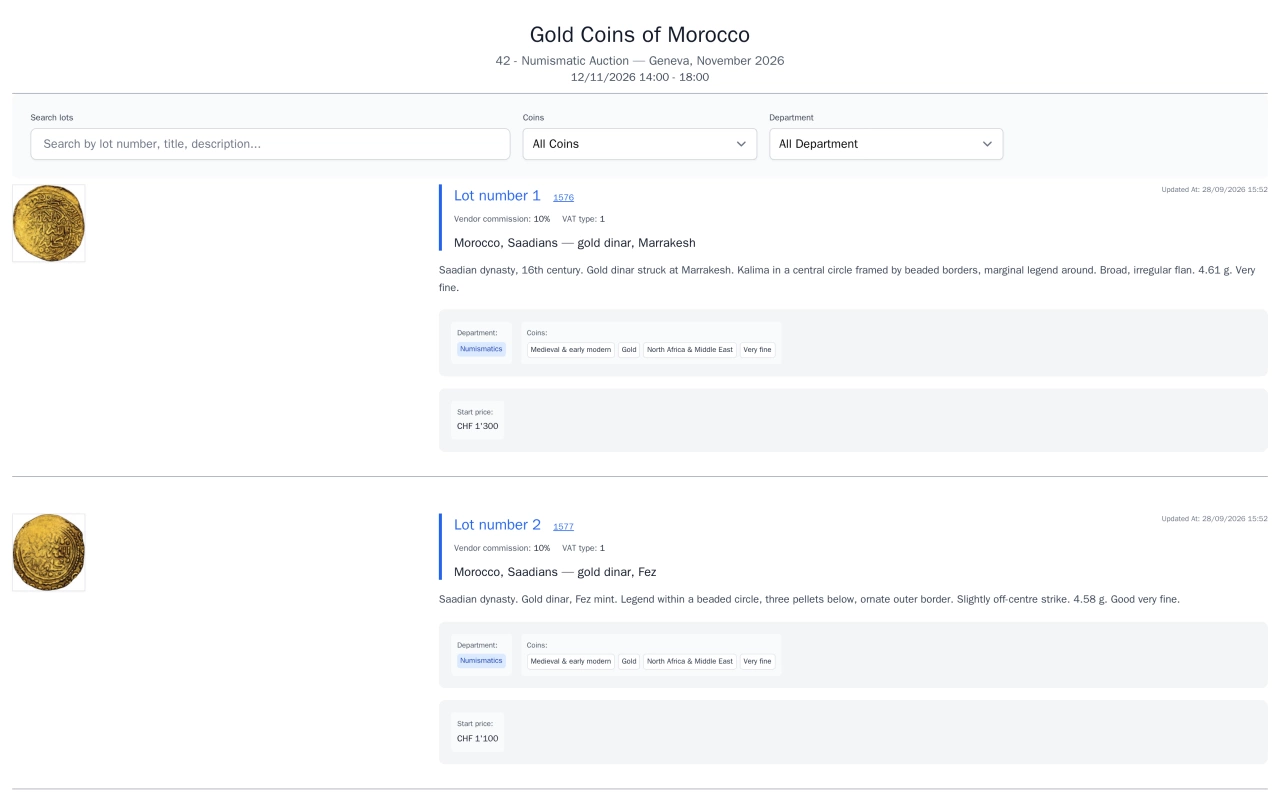
Visitors expect to browse your next sale on your own website, not in a PDF. With Selloff, the website does not hold a copy of the catalogue: it reads it from Selloff through the Selloff API. A WordPress plugin is provided to display it, and the API can also serve other front ends.
The website shows each sale's lots with their number, heading and description, categories, estimate, currency, images in several sizes and, once published, the results. Lot pages add the alternative texts, custom fields, reference catalogue and the tags you choose to show. Visitors search by keyword, category, tag, estimate range or sold and unsold status, sort by lot number, estimate or closing date, and browse dedicated category pages. Each catalogue has its own URL slug, and the PDFs of the catalogue, terms of sale and prices realised can be offered for download.
The same plugin gives clients an account: registration and login, bids and bookmarks, a cart for fixed-price sales, their address and shipping preferences, invoices and consignments. Logins and viewed lots are recorded as activities on the client record.
When anything changes, Selloff sends a cache invalidation request to your website listing the lots, catalogues and categories concerned, and images can be served through a content delivery network.
Export templates produce the files expected by Drouot, Interenchères, Invaluable, AuctionMobility and Ma-Shop, with images renamed to match. Bids and results coming back from the platforms are handled by bid import.
Frequently asked questions
No. Your website reads the catalogue from Selloff through the Selloff API, and Selloff provides a WordPress plugin that displays it. When a lot, category or catalogue changes, Selloff tells your website which pages to refresh, so visitors see the update without anyone copying data.
Yes. A sale is included on the website only when you switch it on and its catalogue is active. Each lot can be hidden from the website for a given sale, results are published according to rules per status (sold, unsold, withdrawn), and sold lots can be hidden from lists. Private scan types and reserves are never published.
Yes. Through the plugin, clients register and log in, place bids, keep bookmarks, buy fixed-price lots through a cart, and see their bids, invoices and consignments. Their logins and the lots they view are recorded in their client record in Selloff.
Related features
Produce a PDF catalogue straight from your lots, or export texts and images for InDesign and other layouts, with image sizes and grouping by category.
Learn moreOrganise lots with your own hierarchical taxonomies, translated categories and description masks per type of object, shared with collecting areas.
Learn moreBring bids, results and registrations from Drouot, Sixbid, Numisbids, Philasearch, Biddr and Excel files into your sale, with contact matching and a review step.
Learn moreRequest a demo
See Selloff running on a sale like yours.
We measure visits with Matomo, an analytics tool we host ourselves. Accept cookies so it can recognise returning visitors. If you refuse them, visits are still measured, without cookies. Privacy policy