Consignments
Consignor management
Set commission, lot fees, insurance, broker and representative per consignment, group lots under receipts, and keep each consignor informed from one page.
Learn moreConsignments
Register each deposit on a numbered receipt with storage location and import details, send lot lists and contracts, and track which signed copies are back.
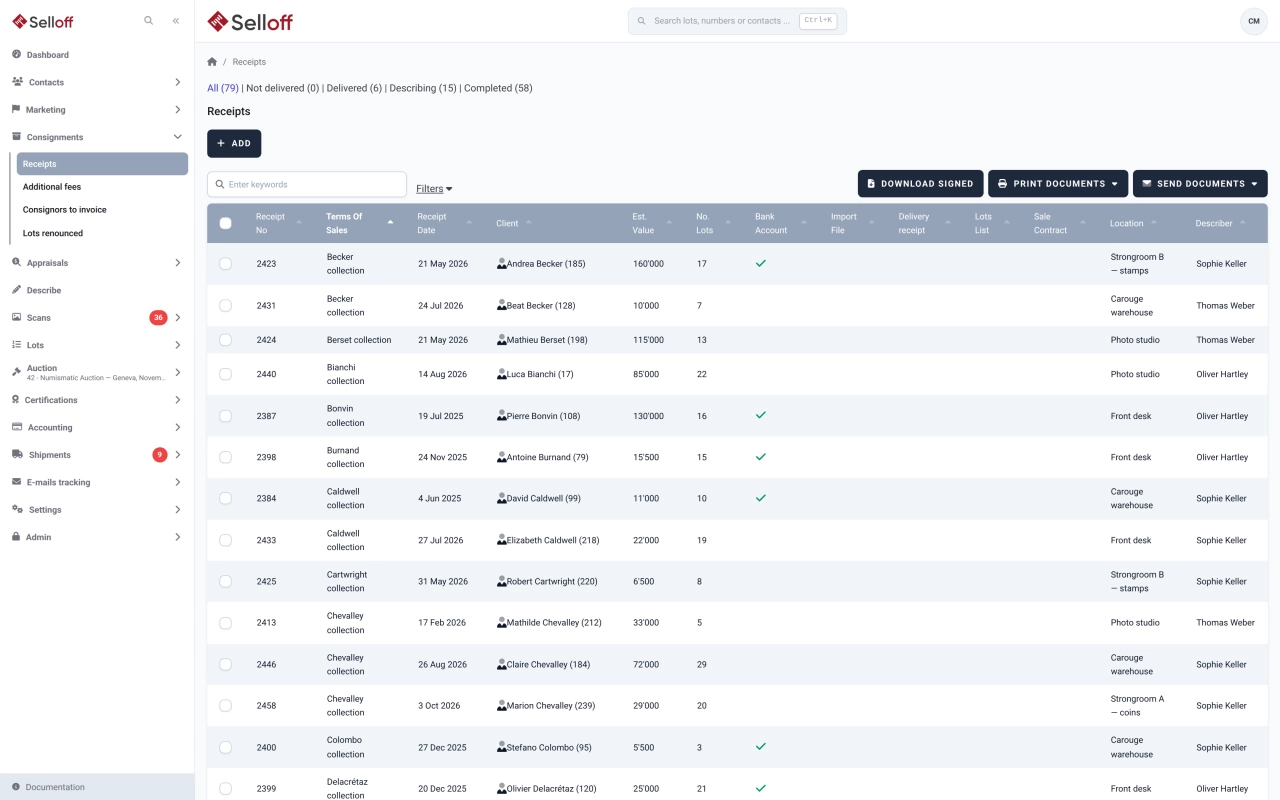
Every time a consignor brings objects in, Selloff records a receipt under their consignment. A receipt has a number, generated automatically from a starting number or entered by hand, a date, a description, the estimated value and number of lots, the member of staff in charge and the storage location of the goods, with free notes on where exactly they are. Its status follows the work: not delivered, delivered and awaiting description, describing, completed.
For goods coming from abroad, the receipt also holds the import number, date, value and file.
The receipt lists its lots with reference, title, main category, currency, starting price, reserve, consignor reference, price paid, describer and current status. New lots are described directly from the receipt, and depending on your settings, lot references are built from the receipt code. Barcode labels can be printed for all lots of a receipt at once.
Three documents are ready to use and can be adapted to your wording: the lots list, the delivery receipt and the sale contract. Print or email them for one receipt or for a selection; when documents are addressed to a representative, their address is used instead. Each document confirmed as printed or sent is filed on the consignor's record.
Documents are signed on paper, scanned and attached. Selloff tracks what has been sent and what has come back signed; by default the delivery receipt is tracked for signature, and other documents can be added. The receipts list filters on signed receipts, import files and receipt date, and signed copies can be downloaded in one go. Settings can make a receipt file mandatory from a given status, so no description starts without a signed receipt on file.
Frequently asked questions
The sale contract, delivery receipt and lots list are printed with a signature block and signed on paper by the consignor. The signed copy is then scanned and attached to the receipt, so Selloff shows which documents are signed and lets you download the signed copies, several at a time as a ZIP file.
Yes. Your administrator can require a receipt file at all times, from the "describing" status or from the "completed" status. Import information can also be made mandatory before completion when goods come from abroad.
The receipt stores the import number, date, value and the related file. For consignors based in another country than the branch, Selloff asks for these import details on the receipt.
Related features
Set commission, lot fees, insurance, broker and representative per consignment, group lots under receipts, and keep each consignor informed from one page.
Learn moreGive every lot a unique reference in your chosen format, print barcode labels on Zebra printers from the browser and scan them at every step.
Learn moreAdapt the layout and wording of every document Selloff produces, from letters and receipts to invoices, in each language, with placeholders and conditions.
Learn moreRequest a demo
See Selloff running on a sale like yours.
We measure visits with Matomo, an analytics tool we host ourselves. Accept cookies so it can recognise returning visitors. If you refuse them, visits are still measured, without cookies. Privacy policy