CRM
Client records & history
One record per contact with addresses, ID and bank details, tags, consignments, bids, invoices and a complete activity history shared by the whole team.
Learn moreCRM
Adapt the layout and wording of every document Selloff produces, from letters and receipts to invoices, in each language, with placeholders and conditions.
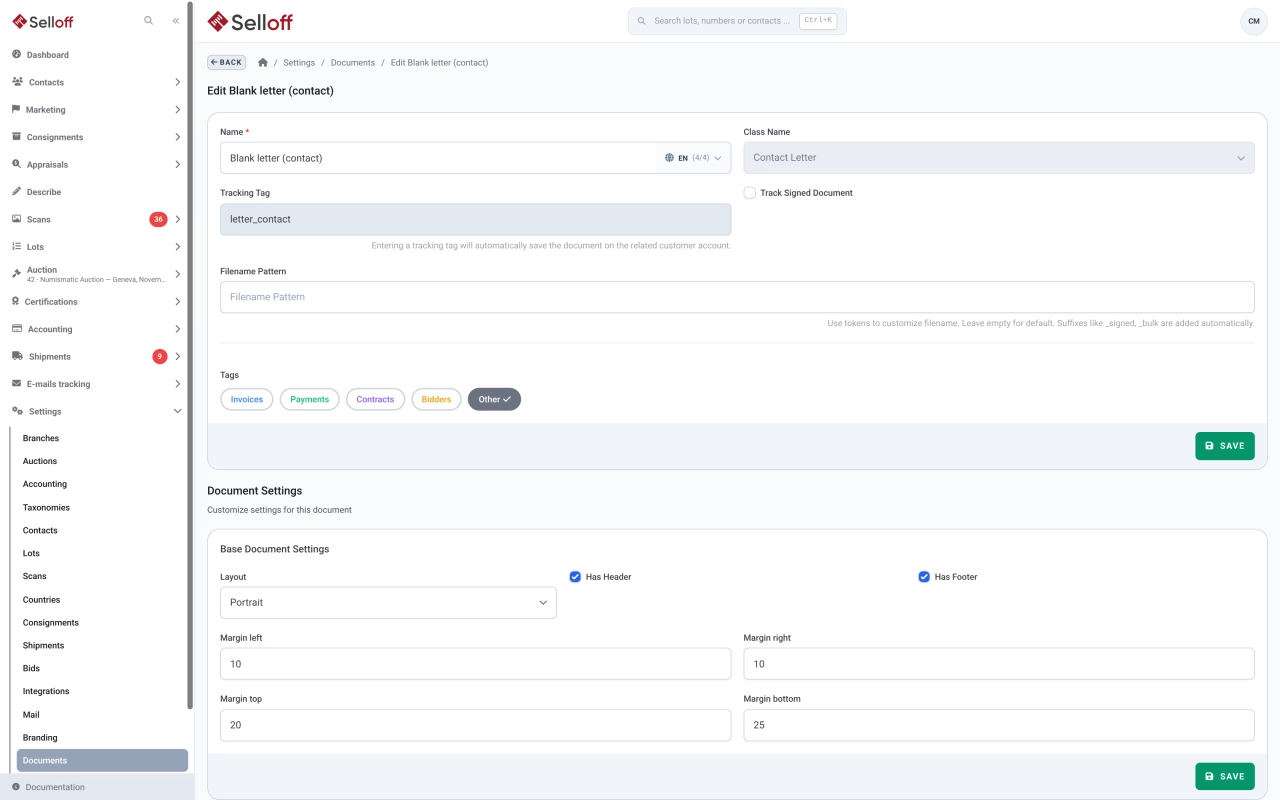
An auction house produces dozens of documents: receipts and sale contracts, description and results lists, invoices and reminders, consignor statements, payment confirmations, bidder sheets and letters. In Selloff they all use the same template engine, so the house style is defined once and applied everywhere.
A template is a sequence of blocks: text, a lots table, a signature area, and more. Each block has a width, offset, colours, border and padding, and can start on a new page; the page itself can be portrait or landscape, with or without header and footer. Texts are written for each language and use placeholders, chosen from a picker, for names, addresses, amounts, lots or branch details. If/else conditions adapt a paragraph to the case, for example when documents are addressed to a representative.
Each template also stores its email subject and body and a file-name pattern. Several templates can exist for the same document type, and a template can be duplicated as the starting point for a new one.
From a contact, an opportunity or a campaign, you start a letter from a template (a blank letter is provided); Selloff fills in the salutation and the contact's details, and prints on the letterhead of the branch you choose. Blocks marked as editable can be adjusted before printing or sending. Campaign letters go to all selected recipients in one run.
Every document printed for a client or sent by email is saved on the contact's activity feed, linked to the consignment, receipt, invoice or other record it concerns. Several documents can go out in a single email, and bulk runs are processed in the background. See client records and email tracking.
Frequently asked questions
Yes. Receipts, contracts, lists for consignors, invoices, statements, confirmations and letters are templates you can edit in the settings: add or move text blocks, place a lots table or a signature area, choose portrait or landscape, margins, header and footer. The branch logo and footer are applied automatically.
Template texts are stored per language, and each document is generated in the preferred language of the contact it is addressed to. Default templates are supplied in several languages, including English, French and German.
Yes. A campaign letter can be printed or emailed to the selected recipients of a campaign, with placeholders filled in for each contact. Large batches are generated in the background, and you receive a ZIP file or a download link when they are ready.
Related features
One record per contact with addresses, ID and bank details, tags, consignments, bids, invoices and a complete activity history shared by the whole team.
Learn moreRegister each deposit on a numbered receipt with storage location and import details, send lot lists and contracts, and track which signed copies are back.
Learn moreCreate buyer invoices and consignor statements from recorded sales in a few clicks, with premium, insurance, fees, shipping and VAT calculated automatically.
Learn moreRequest a demo
See Selloff running on a sale like yours.
We measure visits with Matomo, an analytics tool we host ourselves. Accept cookies so it can recognise returning visitors. If you refuse them, visits are still measured, without cookies. Privacy policy