Inventory & catalogue
Lot descriptions
Describe lots on a screen you configure, with texts, custom fields, categories and images, and generate repetitive headings and descriptions automatically.
Learn moreInventory & catalogue
Upload hundreds of photos at once, matched to lots by file name, with validation, required scan types and a coverage check before the catalogue goes to print.
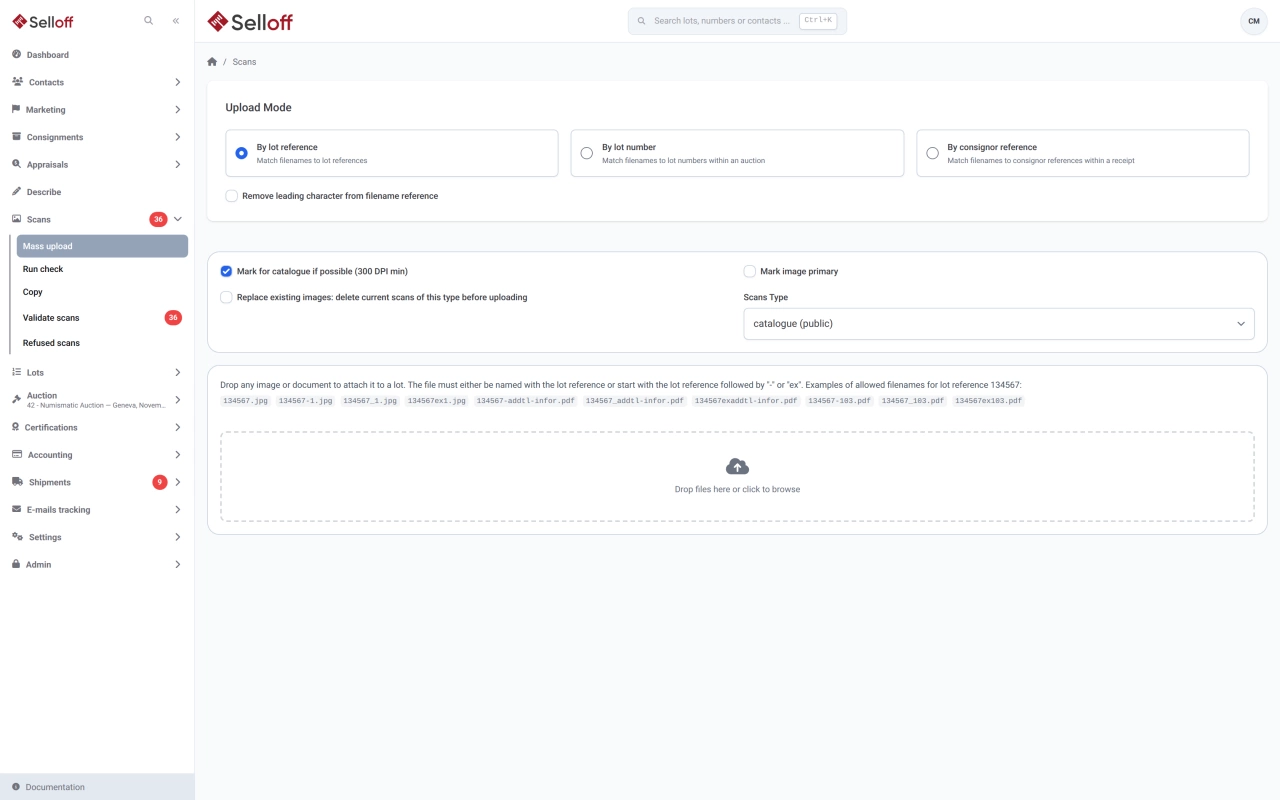
Photography is often done in batches, by a photographer or a studio, long after the lots were described. The bulk upload takes a folder of files and attaches each one to the right lot by its name. Drop the files, choose the scan type, and Selloff reads the reference at the start of each file name, ignoring what follows a dash, an underscore or "ex". Files can also be matched by lot number within a sale, or by consignor reference within a receipt, which is handy when the photographer works from the catalogue or from the consignor's list.
Options let you set the image as the main one, replace the existing images or mark it for the catalogue, which is accepted only from 300 DPI. JPEG and PNG images are supported, as well as PDF documents. Selloff keeps the original and creates medium and thumbnail versions for screens and the website.
Scan types are yours to define: catalogue photos, additional views, certificates, condition reports. A scan type can be private, so it never appears online, and each lot states which scan types it requires. Scan types can require double validation: images then go through a queue where they are validated, refused with a reason or reassigned to another lot, and uploaders see their refusals in their own list.
The scan check gives, for a sale or catalogue, the coverage of each scan type against the lots that require it, with filters on packaging, image size and minimum estimate, and a table of lots with their image counts and main image. It turns "are we ready for the catalogue?" into a list of lots to photograph.
When one image serves several lots, copy the scans from one lot to another instead of uploading them again. See PDF catalogue generation for how catalogue images are laid out.
Frequently asked questions
Start the file name with the lot reference, optionally followed by a dash, an underscore or "ex" and anything else: for lot 134567, 134567.jpg, 134567-001.jpg and 134567ex2.jpg all attach to the right lot. You can also match files by lot number within a chosen sale, or by consignor reference within a chosen receipt.
Yes. The scan check runs on a sale or a single catalogue, optionally limited by packaging type, image size or minimum estimate. It shows, for each scan type, how many lots require it and what share already has it, and lists the lots still missing images. The result can be printed.
Yes. For scan types with double validation, new images wait in a validation queue where a reviewer validates them, refuses them with a reason or reassigns them to another lot. Refusals go back to the person who uploaded them, who can replace or delete the file, and refused images are never published.
Related features
Describe lots on a screen you configure, with texts, custom fields, categories and images, and generate repetitive headings and descriptions automatically.
Learn moreProduce a PDF catalogue straight from your lots, or export texts and images for InDesign and other layouts, with image sizes and grouping by category.
Learn morePublish catalogues on your own website through the Selloff API and WordPress plugin, with instant updates, online bidding, client accounts and platform exports.
Learn moreRequest a demo
See Selloff running on a sale like yours.
We measure visits with Matomo, an analytics tool we host ourselves. Accept cookies so it can recognise returning visitors. If you refuse them, visits are still measured, without cookies. Privacy policy