Consignments
Consignor settlements
Generate consignor statements for a whole sale, deduct commission, fees and VAT, pay consignors once buyers have paid and export transfers to your bank.
Learn moreSales & bidding
Follow each sale from bids to results: realised prices, consignor results, sell-through rate and performance against estimates.
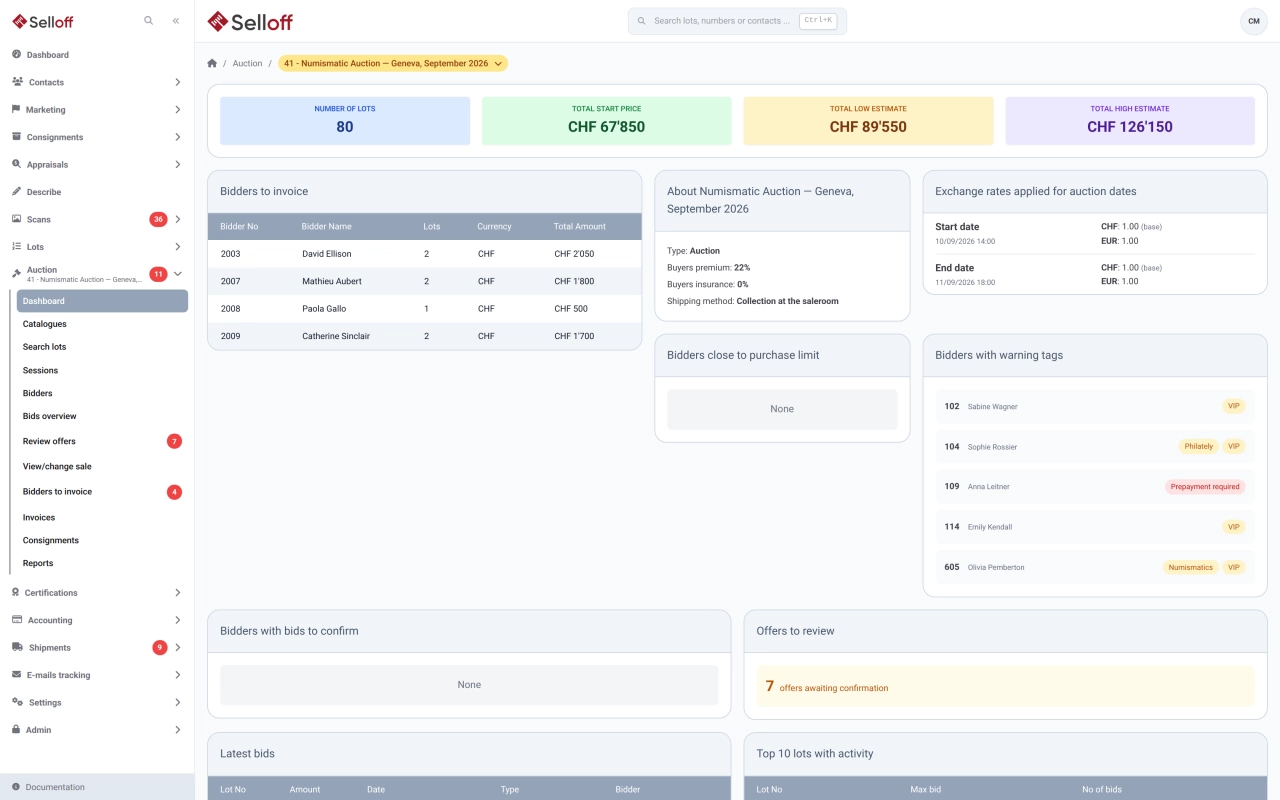
The sale dashboard shows the number of active bidders, the share of lots with at least one bid, the total amount bid, the latest bids and the ten lots with the most activity. The bids overview lists every lot with its estimate, reserve, number of bids, current bid and maximum bid.
Results stay attached to the lot, the consignment and the buyer's record. For each catalogue you can print or export the realised prices, and attach a realised prices PDF to the sale. Results can be marked publishable automatically by status (sold, unsold, withdrawn), so that your website shows them through the API.
Consignors receive their results list by email or on paper, and the consignments view of the sale shows which lists have been sent.
The statistics report groups a sale by catalogue, session, category and subcategory, consignor, describer or consignment, and can cross two groupings. For each group it shows:
The table exports to Excel. Other reports cover statistics by category and by consignor, a results checklist between catalogue and final results, bidder results, and a reconciliation of hammer prices between the buyer and consignor sides.
Every bid records its origin, so you can measure what each platform or channel brings. Financial views such as account statistics, the aging report and the global balance are part of integrated accounting.
Frequently asked questions
Print or export the realised prices of each catalogue and attach a realised prices PDF to the sale. Selloff can also mark results as publishable automatically by lot status (sold, unsold, withdrawn), so that your website shows them through the API as soon as they are recorded.
Yes. From the sale's consignments view, select the consignments and print or email their results lists in one action. Selloff records which consignors have received their list; statements then follow in consignor settlements.
Yes. Group the sale statistics by category, consignor, describer or consignment to compare lots sold, sell-through rate, total sold and performance against estimates, then export the table to Excel.
Related features
Generate consignor statements for a whole sale, deduct commission, fees and VAT, pay consignors once buyers have paid and export transfers to your bank.
Learn morePublish catalogues on your own website through the Selloff API and WordPress plugin, with instant updates, online bidding, client accounts and platform exports.
Learn moreKeep client accounts, the chart of accounts, supplier invoices and balances inside Selloff, per branch and currency, without re-entering sales in another system.
Learn moreRequest a demo
See Selloff running on a sale like yours.
We measure visits with Matomo, an analytics tool we host ourselves. Accept cookies so it can recognise returning visitors. If you refuse them, visits are still measured, without cookies. Privacy policy