Accounting
Payment tracking & reminders
Record and apply payments, see what each client owes, send reminders at three levels with fees, and follow receivables in the aging report.
Learn moreAccounting
Pay consignors and suppliers by uploading a pain.001 file generated by Selloff to your e-banking, instead of typing each transfer by hand.
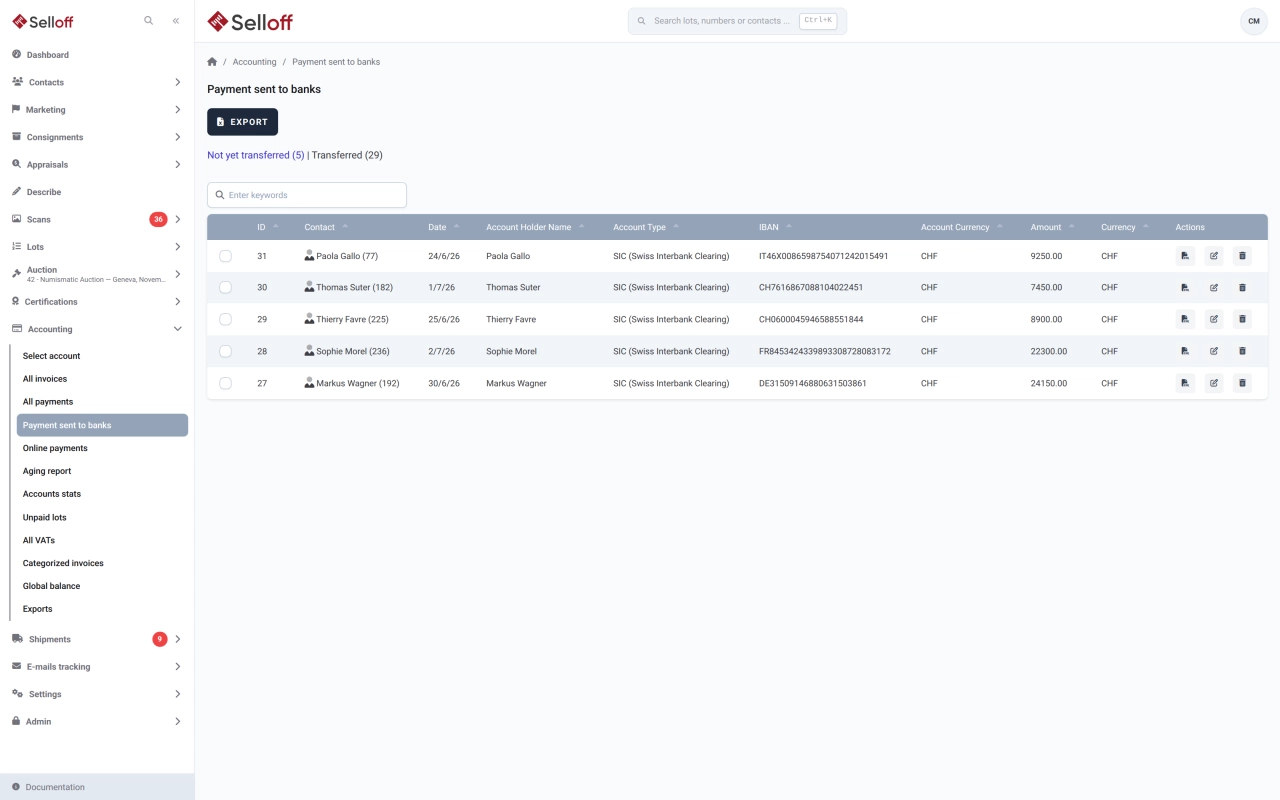
After a sale, consignors receive their net proceeds and suppliers are paid their invoices. With e-banking transfers enabled in the accounting settings, the outgoing payment form in Selloff also records the recipient's bank details (account holder, IBAN, BIC, bank), either picked from the bank accounts saved on the contact or entered on the spot, and checks them before saving. The payment is recorded in Selloff and waits in the Payments sent to banks list.
Select the payments to transfer and export them. Selloff generates an XML file in pain.001 format (pain.001.001.03.ch.02, the Swiss Payment Standards version), one file per debit account, bundled in a ZIP archive when several accounts are involved. Upload the file to your e-banking and approve the payments there.
Before creating the file, Selloff checks that each of your debit bank accounts has its holder name, BIC and IBAN, and lists anything missing.
Payments are listed as not yet transferred or transferred, with the transfer date. Once transferred, a payment can no longer be modified or deleted. Because the payment already exists in Selloff, the client account shows it and it flows into the accounting export.
Accounting staff who pay many consignors after each sale no longer enter each transfer in the bank's interface, and IBANs and amounts are not retyped.
Frequently asked questions
pain.001 is the ISO 20022 XML format for credit transfer orders. Your e-banking reads the file and creates all the transfers it contains, which you then approve as usual.
Yes. Selloff prepares the file; you upload it to your e-banking and approve the transfers there, with your bank's usual signature rules. Selloff never moves money itself.
From the bank accounts saved on the contact's record, or entered with the outgoing payment. The details are validated when the payment is saved, so the file does not go out with incomplete information.
Related features
Record and apply payments, see what each client owes, send reminders at three levels with fees, and follow receivables in the aging report.
Learn moreGenerate consignor statements for a whole sale, deduct commission, fees and VAT, pay consignors once buyers have paid and export transfers to your bank.
Learn moreKeep client accounts, the chart of accounts, supplier invoices and balances inside Selloff, per branch and currency, without re-entering sales in another system.
Learn moreRequest a demo
See Selloff running on a sale like yours.
We measure visits with Matomo, an analytics tool we host ourselves. Accept cookies so it can recognise returning visitors. If you refuse them, visits are still measured, without cookies. Privacy policy